SVG 会议纪要卡片
将多方会议的逐字稿提炼为一张手机端可直接转发的 SVG 卡片——所有参会方拿到同一张图,对齐结论、明确待办。生成 SVG 后自动转 PNG,方便微信/钉钉/飞书直接发送。
Usage
/majia-meeting-svg path/to/transcript.txt
/majia-meeting-svg   # then paste transcript
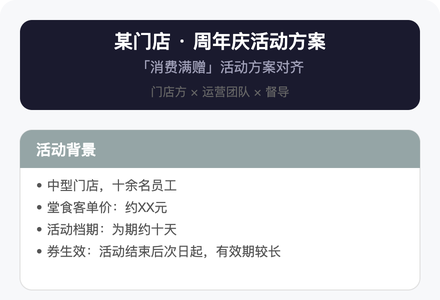
效果预览
信息提炼原则
会议逐字稿天然冗长——闲聊、重复、跑题占大量篇幅。这张卡片的价值在于让每个参会方用 30 秒扫完就知道「定了什么、谁做什么、什么时候」。
- 做减法:只留结构骨架,砍掉寒暄、重复、发散讨论
- 结构化:把散乱对话重组为逻辑模块(背景、结论、待办、分工……)
- 区分已定与未定:标注「已敲定」和「待确认」——这是纪要最核心的价值,比内容本身还重要
- 保留关键原话:重要判断、核心数字直接引用,不要过度改写
内容框架
不限会议类型。根据逐字稿的实际内容,从以下模块中选取 4–7 个组成卡片(不要超过 7 个模块——超过说明还没砍够):
| 模块 | 用途 | 建议色 |
|---|---|---|
| 背景与目标 | 为什么开这个会、要解决什么 | #95A5A6 灰 |
| 各方诉求 | 每一方想要什么、关心什么 | #8E44AD 紫 |
| 已确认方案 | 敲定的机制、规则、方案细节 | #E74C3C 红 |
| 执行链路 | 操作流程、用户路径、技术实现 | #27AE60 绿 |
| 资源与分工 | 谁提供什么、谁负责什么 | #4A6CF7 蓝 |
| 待确认事项 | 还没定的、有分歧的、需要回去确认的 | #E67E22 橙 |
| 时间节奏 | 里程碑、截止日期、上线时间 | #E67E22 橙 |
| 待办清单 | 按责任方分组的行动项,带 checkbox | #1A1A2E 深 |
| 备注 | 背景数据、历史经验、补充信息 | #95A5A6 灰 |
选取原则:
- 「待办清单」几乎必选——没有 action item 的纪要是废纸
- 「已确认方案」和「待确认事项」至少出现一个
- 不是每个模块都要用;宁可少一个模块也不要水内容
版式规范(竖版 · 手机优先)
viewBox: 0 0 440 [动态高度]
width="100%" style="max-width: 440px;"
模块宽度: 400(左右各留 20px)
标题字号: 19px
模块标题: 14–15px
正文: 13px
补充说明: 12px
行间距: 20–22px
模块间距: ≥20px
SVG 代码模式
基础骨架
<svg xmlns="http://www.w3.org/2000/svg" viewBox="0 0 440 [H]" width="100%" style="max-width: 440px;">
  <style>
    text { font-family: 'Microsoft YaHei', 'PingFang SC', sans-serif; }
  </style>
  <rect width="440" height="[H]" rx="16" fill="#F7F8FA"/>
  <!-- 页面标题 -->
  <!-- 内容模块 -->
</svg>
页面标题栏
<rect x="20" y="20" width="400" height="80" rx="12" fill="#1A1A2E"/>
<text x="220" y="48" text-anchor="middle" fill="#FFFFFF" font-size="19" font-weight="bold">会议主题</text>
<text x="220" y="76" text-anchor="middle" fill="#A0A0B8" font-size="13">参会方 · 日期</text>
三行标题时 height 改为 90,加第三行 y 值在 96 附近。
模块卡片
<rect x="20" y="[Y]" width="400" height="[H]" rx="12" fill="#FFFFFF" stroke="#E0E0E0" stroke-width="1"/>
<rect x="20" y="[Y]" width="400" height="38" rx="12" fill="[色值]"/>
<rect x="20" y="[Y+26]" width="400" height="12" fill="[色值]"/>
<text x="36" y="[Y+25]" fill="#FFFFFF" font-size="15" font-weight="bold">模块标题</text>
第二个 rect 补底消除标题栏底部圆角——这是视觉上标题栏和内容区无缝衔接的关键。
正文层次
<text x="36" y="[Y]" fill="#333" font-size="14" font-weight="bold">子标题</text>
<text x="36" y="[Y+22]" fill="#555" font-size="13">• 正文要点</text>
<text x="36" y="[Y+44]" fill="#999" font-size="12">  补充说明(缩进两空格)</text>
待办 checkbox
<rect x="36" y="[Y]" width="18" height="18" rx="3" fill="none" stroke="[色值]" stroke-width="2"/>
<text x="62" y="[Y+15]" fill="#333" font-size="13">待办事项内容</text>
按责任方分组时,先写一行责任方标题(加粗 + 对应颜色),再列该方的 checkbox。我方用 #FF6B6B,对方用 #4ECDC4。
时间轴条目
<rect x="36" y="[Y]" width="8" height="48" rx="4" fill="#E67E22"/>
<text x="54" y="[Y+16]" fill="#333" font-size="13" font-weight="bold">日期/阶段</text>
<text x="54" y="[Y+36]" fill="#555" font-size="12">该阶段要做的事</text>
最后一个里程碑(如「正式上线」)可换绿色 #27AE60。
提示条
<!-- 警告/风险(橙底) -->
<rect x="36" y="[Y]" width="370" height="[H]" rx="6" fill="#FFF3E0"/>
<text x="46" y="[Y+18]" fill="#E65100" font-size="12">警告内容</text>

<!-- 正向/结论(绿底) -->
<rect x="36" y="[Y]" width="370" height="[H]" rx="6" fill="#E8F8F5"/>
<text x="46" y="[Y+18]" fill="#1E8449" font-size="13">正向结论</text>

<!-- 信息/备注(蓝底) -->
<rect x="36" y="[Y]" width="370" height="[H]" rx="6" fill="#EBF5FB"/>
<text x="46" y="[Y+18]" fill="#2471A3" font-size="12">补充信息</text>
分割线
<rect x="36" y="[Y]" width="370" height="4" rx="2" fill="#F0F0F0"/>
配色速查
| 用途 | 色值 |
|---|---|
| 页面标题 / 待办标题 | #1A1A2E |
| 已确认 / 方案 | #E74C3C |
| 资源 / 分工 | #4A6CF7 |
| 执行链路 / 确认项 | #27AE60 |
| 待确认 / 时间线 | #E67E22 |
| 背景 / 备注 | #95A5A6 |
| 诉求 / 洞察 | #8E44AD |
| 行动计划 | #2C3E50 |
| 正文 | #555 |
| 子标题 | #333 |
| 补充 | #999 |
| 我方待办边框 | #FF6B6B |
| 对方待办边框 | #4ECDC4 |
生成流程
- 通读逐字稿——识别参会人、各自角色、核心议题
- 提取骨架——从内容框架表中选取 4–7 个模块
- 填充要点——每模块 3–6 条,每条 ≤ 22 个中文字符(一行放得下)
- 标注状态——已定 / 未定 / 有分歧,分歧要显式标出而非回避
- 算高度——根据内容量估算 SVG 总高度,分配各模块高度
- 输出 SVG——按上面的代码模式生成,用 Write 工具写入文件(如
meeting-minutes.svg) - 转 PNG——SVG 写入后立即运行脚本生成 PNG,方便直接在手机 IM 中发送:
产出同名python3 <skill-dir>/scripts/svg2png.py meeting-minutes.svgmeeting-minutes.png(2x 分辨率,适配 Retina 屏幕)。 - 一句话总结——告知用户两个文件的路径,写 2–3 句话:最关键的结论 + 最紧急的待办
红线
- 一个模块超过 8 条→砍
- 人名只留关键决策人
- 数字(金额、日期、比例)必须准确——最容易出错也最致命
- 「待确认」比「写错」好一万倍
- SVG text 不自动换行——超长必须手动拆成多个 text 元素
- 特殊字符转义:
&→&,<→<,>→> - 心算一遍 Y 坐标——任何元素不能重叠
👤 作者 / 联系
马甲(@maojiebc) · 超级马甲
如果这份 skill 帮到你,欢迎在以下任意渠道找我交流踩坑实录、提需求、报 bug,也欢迎勾兑用户运营 / 数据中台 / BI 工程的实战经验:
| 渠道 | 链接 |
|---|---|
| m9224@163.com | |
| 🐙 GitHub | github.com/maojiebc |
| 🪝 ClawHub | clawhub.ai/p/maojiebc |
| 🐦 X | @maojiebc |
| 📕 小红书 | 超级马甲 |
| 📰 微信公众号 | 超级马甲 |
这份 skill 是 14 年用户运营 + 一线协同实战沉淀出来的,问题/合作随时聊。